Showing posts with label grid. Show all posts

Friday, 9 October 2015

Getting your priorities right

I want to take a look at implementing prioritisation in redis.workflow. Currently, all workflows have the same priority; redis.workflow is all about throughput. If all tasks are going to be completed by some SLA-agreed time then it doesn’t technically matter which order everything is run in, and we can run through workflows in any order, as long as there’s no slack time in task turnover.

However, there contexts in which pure throughput isn’t enough. Sometimes its social: someone arbitrarily wants to see a graph showing a steady completion of recognizable sets of workflows. Sometimes it’s based on operational information: not all workloads are heterogeneous, and might have long-tail task duration distributions; and those long runners will breach your delivery SLA if you start them too late.  Sometimes you have combined workloads: the system might be responsible for both batch throughput calculations and ad-hoc calculations issued directly by someone who’s waiting for an answer, and wants some guarantee that they’re not wedged behind a freight train of batch work. Sometimes it’s simply SLA based: you have 24 hours worth of work, but some of it needs to be delivered by 8am, and some of it by 5pm.

In many ways then a pure throughput system might not meet all requirements, and in each of the scenarios above a decision needs to be made about each item of work: do I need to get this work done first, or that? The system needs to understand work priority.

In detail it’s also worth considering where the priority lies. Currently I’m considering prioritising workflows only relative to each other. That said it’s as easy to implement task-level prioritisation as it it to implement workflow-level prioritisation; doing the former gives me a little more flexibility, and I (or any client) could replicate workflow-level prioritisation by giving every task in a workflow the same priority.

Prioritisation itself can be simple or sophisticated, but will definitely have consequences for the structures used in redis.workflow.

Currently redis.workflow uses a queue of submitted tasks, which is fine for a simple throughput scenario. I could extend it to make practical binary priority decisions by enqueuing high priority tasks at the front of the queue, and low priority tasks at the back, without the need for a new structure.

If finer grained priorities are required then things get a little harder. If the number of levels of priority is small then having a queue per priority might be feasible; in fact, combined with the enqueue-to-front-or-back trick you only need half the number of queues as you have priority levels.

If very fine-grained or arbitrary priorities are needed, then I’d need to start thinking about maintaining relative order in the queue or list. Insertion at a given priority could happen between work of higher and lower priority, which would require iterating through the list to work out where to put it, or just enqueuing, then sorting the list. That’s likely to perform underwhelmingly; a more sophisticated solution would be to add a lookup that identifies priority boundaries by queue position.

Each of these is a reasonable way of managing prioritised work. Clearly enabling the use of arbitrary priorities would allow clients to choose, and even use simpler (say binary or even fall back to unary) prioritisation, but come at a cost in terms of complexity.

The binary high/low priority solution – enqueuing to front or back – is relatively easy to imagine in my existing code, as it’s already placing work at the back. Jumping to arbitrary priorities is harder, but it’s worth considering what would need to be done.

To manage arbitrarily prioritised work, I’d need to sort the work submitted in some way. Redis does have a sorted set, which offers O(log N) lookup and insertion by score. I’d need to be able to remove the highest-scoring task, which I would be able to do with

zremrangebyscore submitted:<type> <minPriority> <maxPriority> limit 0 1

except that there’s no limit out-of-the-box for zremrangebyscore. Instead, I’d have to use zrange to return a sorted list of items (although this sorts from lowest to highest score, meaning I need to decide whether 0 is low or high priority) then use zrem to remove the task.

I implemented this sorted-set-based prioritisation and ran it thorugh the benchmark app, giving each task the same priority. It was noticeably slower, taking about 485 seconds to run through the benchmark (a churn of about 1.8k tasks per second). Task and’ actual workflow completion seemed to keep pace with submission, but handling of the messages announcing workflow completion seems to fall behind, suggesting that it’s not scaling well in this example.

benchmark-withpriority

The benchmark needs to be extended to test workflows with varying numbers of tasks, and tasks with varying priorities.

For this moment I think that’s enough; there’s a wide range of ways of tackling the prioritisation problem, but the implementation of each is fairly straightforward in Redis. The way I’ve implemented it gives it a certain amount of flexibility – a client can configure priority at task or workflow level, but does slow things down. It’s possible the other, simpler methods have a less detrimental effect on performance; as the difference in performance is so significant it might make sense to consider making use of prioritisation configurable, although that’ll be difficult as it has fundamental consequences for the structure of the data in Redis.

Friday, 2 October 2015

Task type differentiation and looking a bit more SoA

At the moment all tasks are considered the same. If a client wanted to process only “widget painter” tasks it wouldn’t be able to, unless it pulled tasks from the queue then decided whether to process them or not. If not – there’s not much it could do, as the tasks are off the queue. It could throw them away, which isn’t very constructive.

More practically, the client could hand tasks off to components suited to dealing with them. This complicates the client architecture, as it introduces the need for a broker component that can do a fine-grained distribution of work, along with internal queuing based on task type. That can quickly become a full-blown project in itself.

To avoid the need for a broker component (but also not to obviate them entirely) it makes sense to handle this queueing of tasks by type in the workflow management domain; to advertise submission of tasks of each type using a distinct channel, and allow clients to subscribe to channels that advertise submission of tasks that they can handle. In my workflow system that means having a dedicated submitted queue for each arbitrary task type, and in turn, submission messages would need to be published on dedicated channels.

The supporting functionality would all need to become task-type aware – popping a task would involve knowing what task type to pop; pause and release would need to know which queues to place tasks back in; and so on.

Not only do we need dedicated submitted:type queues, but if we’re going to ask questions about all the submitted tasks then I’ll need a submittedTypes set just so I can locate all the submitted:type queues that are in use.

Finally; what should the task type specified be? The most straightforward immediate answer is for it to be an arbitrary string. That means we’ll be creating an arbitrary subschema of lookups that map a set of client-defined types with tasks. That looks like the beginning of a general system I have in mind that allows the client to associate any number of arbitrary properties with tasks, not just a type; but to meet this use case – allowing the client to differentiate tasks by a given type – this should be enough.

Wednesday, 30 September 2015

Handling Redis messages in parallel

In the last post it looked like the rate of submission and completion of tasks was constant in time, but that the rate of completion of workflows was not.

There are two end member scenarios: if tasks were completed in strict workflow order then there’d be a steady progression of workflows completing, giving a constant rate; alternatively, if the first 8 tasks in every workflow were completed first, and the last task only started when every other workflow had been touched, then all workflows would complete almost instantaneously right at the end of the run. What I saw in the last results might represent a balance between the two.

The workflow completion behaviour might also be controlled or modified by the messages in flight from Redis, and by the way these are both published and picked up by the client (StackExchange.Redis). I’m assuming that Redis will not stall while it passes a given message to every consumer subscribed, and I’m assuming that StackExchange.Redis will make a separately-threaded callback into my code whenever a message is received, probably subject to some throttling.

There are a couple of things there that I can check. One is the number of running tasks at each moment; if we’re handling these in a multithreaded way (via StackExchange.Redis – there’s no such behaviour in the benchmark app yet) then it should be observable. The other thing to check is the size of the submitted queue.

I added some instrumentation to my benchmark app to output these and, voila:

image

The submitted queue size reaches a plateau then hovers there, which intuitively means that across all workflows we’re finishing one task and replacing it with another in the submitted queue. It tails off roughly in line with the workflow completion curve.

One very interesting point to take away there is that the number of running tasks at any time is 1.

That indicates that somewhere the processing of tasks is either bottlenecked or significantly throttled. I’m not doing anything in my app. Is StackExchange.Redis serializing the handling of the returned messages?

It turns out that it is. By default, StackExchange.Redis forces subscribed message handling to be sequential, principally because it’s safer: it stops clients having to worry about thread conflicts when processing the messages.

However, when you want to scale out it makes sense to let go and account for possible threading issues by design. In this case, each workflow task is intended to be a unit independent of any other, and so they’re embarrassingly parallelisable. In fact, currently the creation of the multiplexer is in the hand of the client, so they can make the choice themselves.

If I set ConnectionMultiplexer.PreserveAsyncOrder = false in the benchmark app, things improve considerably. Task churn leaps to 4k per second; the whole run completes sooner (210 seconds) with the push only finishing at 168 seconds.

benchmark-2

There’s a lot less dispersion in the message handling – the workflow complete queues are much tighter, and the count of tasks completing follows the submitted count much more closely. After a suppressed start the system completes workflows at a steady rate.

For the bulk of the run task submission and completion, and workflow completion, proceed at a constant rate. That indicates that this solution might scale out with an increasing number of tasks or workflows.

It’s not all sunshine and rainbows. When repeated I’ve seen occasional timeouts which currently bring the workflows down. Superficially they seem to be correlated with the points at which Redis forks and saves out its logs – typically I see error messages like

Timeout performing EVAL, inst: 1, mgr: ExecuteSelect, err: never, queue: 22, qu: 0, qs: 22, qc: 0, wr: 0, wq: 0, in: 0, ar: 0, IOCP: (Busy=0,Free=1000,Min=4,Max=1000), WORKER: (Busy=20,Free=2027,Min=4,Max=2047), clientName: TIM-LAPTOP

This seems to indicate that 22 commands have been sent to the server (qs), but no response has been received (in); consequently it might worth increasing the timeout. If it is related to the Redis background fork-and-save, perhaps there’s something I can do there too.

Monday, 28 September 2015

First look at performance for workflow processing

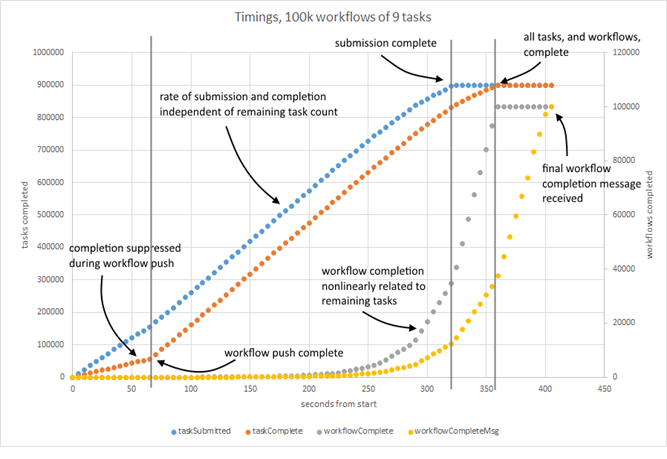
I’ve set up a simple benchmarking app to get a look at how my new Redis-based workflow processing system was going, and used it to create 100k workflows, each containing 9 tasks. The workflow structure is identical for each: just a simple chain. I ran it and a Redis instance on my dev laptop, and gathered data about task submit and completion time, and workflow completion time – both actual, and when I received the Redis pub-sub message to confirm completion.

image

It took ~350 seconds to run through 900k tasks (each as close to a no-op as possible) giving an overall churn around 1k tasks per second. It took ~60 seconds to submit 100k workflows with initial tasks, or about 1.5k workflows per second.

Completion of tasks was noticeably suppressed during workflow submission, and as a result the number of completed tasks lags behind the number of submitted tasks. However, it looks like the rate of task submission and completion – the key parts of workflow turnover – are independent of the number of tasks to run, suggesting that this behaviour scales.

There are some features that I don’t immediately understand, however. The rate of workflow completion is not linear; completion is delayed, as you might expect, but the rate increases with time.

Additionally, there’s a delay between actual workflow completion and the delivery of the message that signals that a workflow has completed. The rate of delivery looks consistent with the rate of completion, but the delay is consistently about 50 seconds. Two things immediately occur to me; as the system’s using message passing to flag submission of new tasks that they might also be affected by a delay; and that arguably we might not need to wait for a message to tell us that a workflow has completed. As I’m marking tasks complete synchronously from the client, it could potentially tell me that there are either more tasks submitted as a result, or none, in which case I could reasonably take some sort of action (although that action would need to be shared across all task handling processes, if I had such).

In fact, there’s a problem with the way I’ve labelled the curves – it’s not obvious that workflow completion time is nonlinearly related to the number of remaining tasks. I’m making an assumption.

Next things to check: I’m going to add a periodic sampling of the queue size to add to this chart, and see if its possible to analyse the number of messages being posted. 

Wednesday, 27 July 2011

Constructing a task occupancy time series from discrete task start and end times

When finding my way around a new distributed system I often want to see a chart of the number of tasks running on a system at the same time but only have discrete task start and end time data. Even if time series data already exists, it’s often not broken down in a meaningful way – say by task type, or final status.

So: how do I build a time series like this from a set of discrete start and end times?

I tackle this in three steps. First, I build and sort lists of start and end times. Secondly, I process these two lists to get a task event dataset: every start takes a running count of tasks up, and every end takes it down. Finally I process that event dataset to build a time series based on discrete time points.

Building sorted lists of task start and end times is pretty straightforward. I typically dump start and end time data from the database, which might look like this:

2011-07-19 04:02:45.0730000,2011-07-19 04:03:21.6000000
2011-07-19 04:02:45.0730000,2011-07-19 04:03:44.7030000
2011-07-18 22:58:52.1800000,2011-07-18 22:58:52.6670000
2011-07-18 22:58:53.3500000,2011-07-18 22:58:57.7700000
2011-07-18 22:58:52.1800000,2011-07-18 22:58:52.7200000
2011-07-18 22:58:53.3500000,2011-07-18 22:58:58.4030000
2011-07-18 22:58:52.1800000,2011-07-18 22:58:52.7100000
2011-07-18 22:58:53.3500000,2011-07-18 22:58:57.7700000
2011-07-18 22:58:52.1800000,2011-07-18 22:58:52.7630000
2011-07-18 22:58:53.3500000,2011-07-18 22:58:57.7700000

and then use the excellent FileHelpers library to load them in. I make some assumptions about the data – the earliest start is earlier than the first and point, at least.

After that, sort the lists in place in ascending time order.

var starts = new List<DateTime>();
var ends = new List<DateTime>();
foreach(var task in tasks)
{
	starts.Add(task.start);
	ends.Add(task.end);
}

starts.Sort((a, b) => 
	Convert.ToInt32(new TimeSpan(a.Ticks - b.Ticks).TotalMilliseconds));
ends.Sort((a, b) => 
	Convert.ToInt32(new TimeSpan(a.Ticks - b.Ticks).TotalMilliseconds));

Merging the two lists to create an event dataset is a little trickier. I do it by processing either the start or the end list in order at any time, swapping between them when the timestamps in one jump ahead of the timestamps in the other. I keep a running count of tasks (the occupancy) – every start takes it up, and every end takes it down.

int currentIndex = 0;
int otherIndex = 0;
int runningCount = 0;
var currentList = starts;
var otherList = ends;
var incdec = 1;

var timestamp = new List<DateTime>();
var value = new List<int>();

while (currentIndex < currentList.Count - 1)
{
	runningCount += incdec;
	timestamp.Add(currentList[currentIndex]);
	value.Add(runningCount);

	currentIndex++;
	if (currentList[currentIndex] > otherList[otherIndex])
	{
		var tempIndex = currentIndex;
		currentIndex = otherIndex;
		otherIndex = tempIndex;
		var tempList = currentList;
		currentList = otherList;
		otherList = tempList;

		incdec *= -1;
	}
}

This generates a relative time series, with offsets from the number of tasks running at the start of the dataset. To constrain this I’d need to work out what that initial number of tasks is. Generally I’d count the number of tasks that started but didn’t end before my time series starts.

Finally, create a discrete timeseries with evenly spaced points. I just generate a list of timestamp points and for each take the nearest previous recorded occupancy value. Generally I’ll also take a highwater mark, as otherwise you lose a feel of any peaky behaviour within between points.

var index = 0;
var dt = new TimeSpan(0, 5, 0);
var current = timestamp[0];

while (current < timestamp[timestamp.Count - 2])
{
	var next = current.AddTicks(dt.Ticks);

	var highwater = 0;
	while (index < timestamp.Count - 1 
		&& timestamp[index + 1] < next)
	{
		index++;
		if (highwater < value[index]) 
			highwater = value[index];
	}

	Console.WriteLine(current + "\t" + value[index] + "\t" + highwater);
	current = next;
}

You’ll notice this is quite loose; I’m not really worrying about interpolating to get values at exact time series points, and so on.

And that’s basically it. When building your series you can fold in extra information – about the task type for example – and use that to show how the system treats different task types.